

Workplace settings by zone
Key zones and settings typically included in government offices.
This section explains the different settings typically offered in government offices organised by zone. Use this guide to understand each type of space, how it works, and where it best fits in a floor plan layout.
Considering feasibility
Agencies should consider the extent to which they can adopt the following zones and settings by:
- assessing new builds and major refurbishments on a project‑by‑project basis, considering scope, budget and timeframes
- looking at what can be practically achieved in the building and any limitations related to cost or structure
- working with the landlord and other tenants (if applicable) to understand feasibility and agree on the most appropriate approach.
Focus zones
Quiet, low‑stimulus spaces for concentrated work, privacy and decompression.
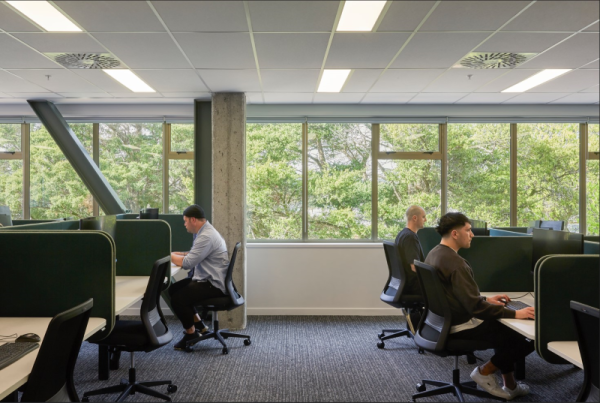
People working in focus zone at Mā Wai Hakona, Wellington.
Working spaces
These typically offer low noise, minimal visual distraction and acoustic privacy where appropriate.
Settings may include:
- Focus booths – short‑stay, individual work settings that offer visual privacy and reduced distraction for concentrated tasks. Ideally located away from active zone and high‑traffic routes.
- Phone booths – small, enclosed pods for private calls or short video meetings.
- Focus rooms/quiet rooms – enclosed rooms for confidential conversations and concentrated work.
Wellbeing spaces
Discrete spaces that support personal wellbeing. They should be inclusive, accessible and non‑denominational, and located away from main work areas to provide privacy. Settings may include:
- Wellbeing spaces – multi-purpose spaces for quiet reflection, prayer or karakia, cultural practice, decompression, or managing stress, sensory needs or health conditions.
- Health/recovery rooms – private spaces for unwell staff to rest until they can leave the office safely.
- Parents' room – private spaces for expressing milk or caring for infants, with appropriate privacy, hygiene, and storage considerations.
- Retreat spaces – low‑stimulus areas within the open plan layout for short breaks or quiet time.
Ambient zones
A comfortable environment for everyday individual and small‑group work, general team discussion and planned meetings. With most routine activity happening in these zones, there is moderate background noise and they are generally located close to both Focus and Active zones for convenience.
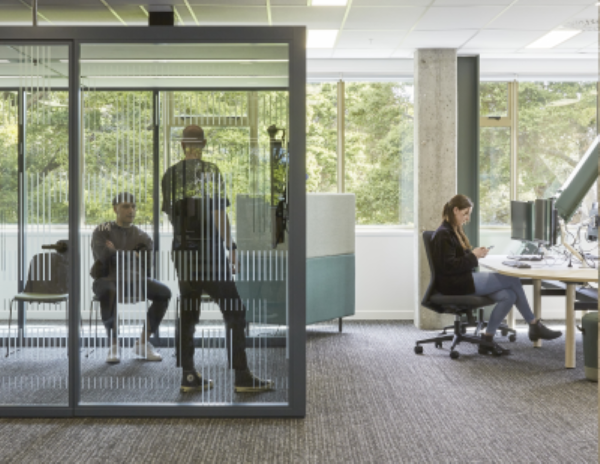
Meeting pod and touchdown table at Mā Wai Hakona, Wellington.
Individual workstations
Unassigned settings in the open-plan layout that support independent tasks, dialling in to meetings, and general discussion with others sitting close by. Settings may include:
- sit-to-stand workstations – primary workstations for longer periods of focused work
- touchdown tables – short‑stay workstations for quick touchdowns between meetings.
Meeting rooms
Enclosed spaces for planned discussions, workshops, or structured conversations or group activity. These spaces should be:
- technology-enabled and bookable
- designed for good acoustics with glazing treatments for visual privacy where needed
- equipped with adequate power and data
- inclusive and accessible, such as providing sufficient clearance around all usable sides of the table
- fitted with blinds for external glazing
- equipped with user‑controlled comfort settings where appropriate (e.g. HVAC and lighting).
Settings may include:
- Meeting rooms (various sizes) – fully enclosed, built-in rooms for two or more people, with acoustic and visual privacy where needed.
- Conference rooms – larger enclosed spaces for formal group/team meetings or multi‑agency discussions.
- Training rooms – flexible rooms for learning, development, and larger facilitated sessions.
- Meeting pods – typically furniture-based, enclosed settings that supplement meeting rooms and support quick, unplanned meetings or conversations. These settings are typically non‑bookable.
Reception area
Area that supports visiting staff and external guests.
Settings may include:
- Reception – the welcome point for all visitors and guests, including sign‑in facilities.
- Waiting areas – adjacent and visible to the reception where visitors and guests can wait comfortably.
- Meeting/conference facilities – tech‑enabled and bookable rooms with good acoustics, privacy, and appropriate power and data, and accessibility features such as adequate clearance around all usable sides of the table. Conference spaces should be designed to be flexible with furniture that can be reconfigured, and easy for facility staff to service and support.
- Reheat kitchen – for catering events and conferences.
- Cultural space – a space that reflects cultural narratives and values. It may support formal welcomes (pōwhiri, mihi whakatau), cultural practice (e.g. kapa haka, waiata practice), meetings, gatherings, or conferences. If the primary purpose of the cultural space is internal (e.g. staff practice, reflection, whanaungatanga), it may be better located within staff‑only access areas.
Active zones
High‑movement, high‑interaction areas for collaboration, socialising, events, stand‑ups, and group/project work.
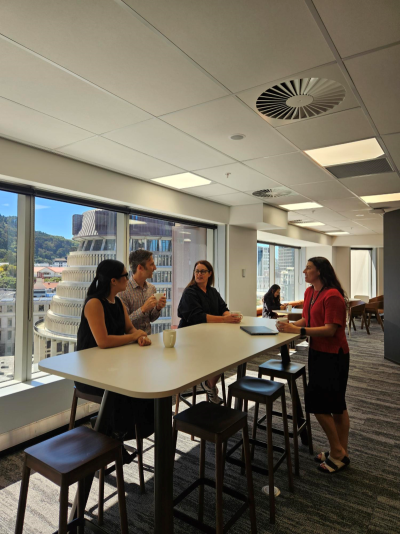
Informal catch up on a connect floor at Te Iho, Wellington.
Collaboration spaces
Shared spaces for working together (planned or impromptu) on tasks, projects, and team activities.
Collaboration spaces should be:
- easy to access from ambient zones
- located near primary circulation routes
- adjacent to meeting rooms for before‑ and after‑meeting conversations, and/or near on‑floor social spaces
- located away from quiet zones unless acoustically separated.
Settings may include:
- Open collaboration areas – informal spaces for quick stand‑ups, shared tasks, or team discussions.
- Project spaces – areas set up for longer periods of collaborative project work, often with writable or pin‑up surfaces.
- Writable or display surfaces – can be fixed or mobile for planning, brainstorming and team communication.
- Meeting pods or booths – these settings supplement meeting rooms and support quick, unplanned meetings or conversations. These settings are typically non‑bookable and provide more discretion than open‑plan collaborative areas.
Social spaces
Spaces that support informal interaction, connection, and community-building.
These settings should be:
- easy to access
- centrally located where practical
- designed to avoid congestion during busy periods.
Settings may include:
- Kitchens and kitchenettes – facilities for preparing drinks, reheating food, and storing personal or shared consumables; should be open, have accessible facilities, and located to support movement and social interaction while avoiding bottlenecks.
- Breakout spaces – positioned near kitchens and kitchenettes offering places to sit, engage, and eat or drink.
- Open‑event spaces – flexible areas designed for staff gatherings, events, celebrations, and larger informal activities.
Central support and technical spaces
Operational areas that support the workplace to function.
Settings may include:
- storage rooms (general, equipment, records)
- utility rooms/print and copy areas
- server/IT rooms
- facilities management/cleaners' stores
- furniture stores
- security control rooms
- mailrooms.
IT space
Dedicated technical areas that support digital infrastructure and staff IT needs. Typically, access-controlled and operational in nature.
Settings may include:
- floor IT/comms rooms
- IT build areas
- IT help desks
- dedicated storage rooms.
Toilets and end-of-trip facilities
Spaces that support commuting, personal care, and hygiene.
Settings may include:
- Showers and changing rooms – including accessible and a mix of gender specific and all-gender facilities.
- Sports lockers.
- Bicycle storage.
- Accessible toilets – available on each floor, where possible, and located on accessible routes. Consider hoists or additional features required to support accessibility needs.
- Toilets – prioritise self‑contained toilets with full‑height walls, each equipped with their own basin and hand‑drying. This means they can be used by everyone and can improve privacy and efficiency. Include at least one larger self‑contained toilet per floor, where possible, to support people with limited mobility or dexterity.